
How to raise a Ticket with 9 Technology Group LTD (Superops)
Method 1: Via the 9 Logo on your task bar
1. On the bottom right of your screen, locate the Purple Number 9 icon and click on it. Sometimes it might be hiding in the up-arrow menu (Highlighted Blue).
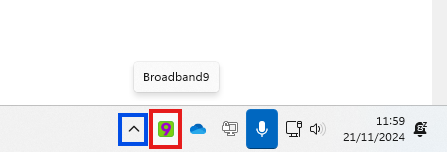
2. Click the “Raise Ticket”, after which it should open your web browser to the Superops ticket creation page.
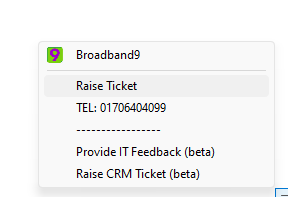
It will then bring up a web page asking you for the details of your enquiry.
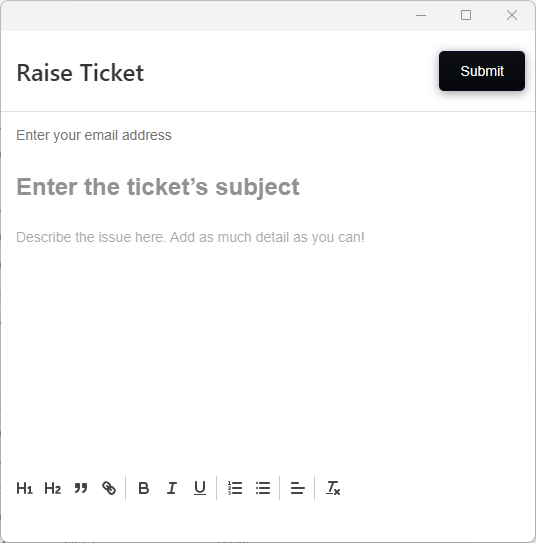
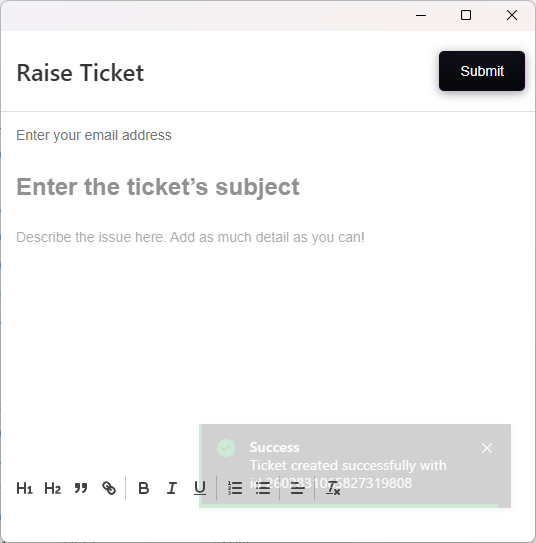
3. Fill in the ticket with whatever details that are required, then click Submit. After submitting the ticket, the ticket will be received by the relevant department you have chosen in the ticket.
Method 2: Via email
You may email in your Support enquiry by emailing to ticket@9.technology
This will automatically get raised within our system as an IT Support ticket for our team to look at and respond to.
Method 3: Via telephone
These are our telephone and email contacts for your convenience :
|
Email addresses:
|
|
|
Technical Support
|
|
|
Finance / Invoice Enquiries
|
|
|
Sales Email
|
|
|
Account Management
|
|
|
Confidential Feedback
|
|
|
|
|
|
Contact Numbers:
|
|
|
Telephone Contact (Support and other enquiries)
|
01706 404099
|
|
WhatsApp Contact
|
03330 509960
|
|
IT Support Hours
|
9am – 5PM Monday to Friday
(Including Bank Holidays)
|
|
Out of Hours
|
Email / Ticket only
|
|
Emergency Mobile
|
07864601301 (Ibrahim / Director)
|
|
|
|
|
Portal Links:
|
|
No Comments